DimmerKun - Smart Screen Dimmer & Multi-Monitor Brightness Controller
A downloadable tool
- "Go beyond the hardware limit. The ultimate screen dimmer with multi-monitor support." (ハードウェアの限界を超えよう。マルチモニターに対応した究極の画面調光ツール。)
- "Protect your eyes during late-night PC sessions. Control and schedule dimness for each display individually." (深夜のPC作業から目を守る。ディスプレイごとに暗さを個別にコントロール&スケジュール管理。)
- "Is your screen still too bright at 0%? DimmerKun lets you dim your display up to 97%!" (明るさ0%でもまだ眩しい? DimmerKunなら画面を最大97%まで暗くできます!)
2. 商品説明文(Detailed Product Description)
【Title】
DimmerKun - Smart Screen Dimmer & Multi-Monitor Brightness Controller
【Description】
"Even at the lowest physical brightness setting, is your screen still too bright in a dark room?" "Do you want to easily control the brightness of multiple monitors individually?"
DimmerKun is the perfect Windows utility helper designed to solve these issues. It goes beyond standard hardware brightness limits, allowing you to dim your screen by overlaying a black layer up to 97%. With a sleek, modern dark-themed user interface, it blends seamlessly into your Windows desktop while protecting your eyes from strain.
【Key Features】
- 🕶️ Dim Beyond the Limit Dim your screens up to 97% using a smooth black overlay. Perfect for working, gaming, or reading in pitch-black rooms.
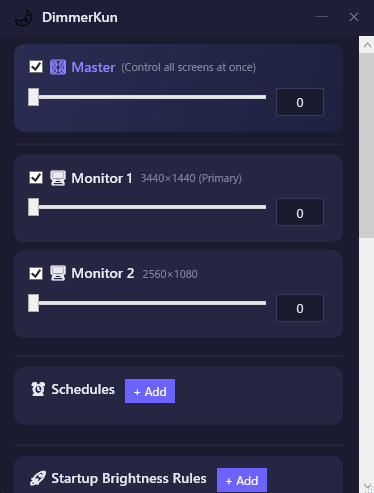
- 🖥️ Independent Multi-Monitor Control Control multiple monitors individually. You can set different dimness levels for your primary and secondary screens to suit your setup.
- ⏰ Automated Scheduling Set multiple schedules to automatically dim your screen at specific times. It also supports smooth fade-in/fade-out transitions.
- 🚀 Smart & Lightweight Background Run Equipped with auto-run on Windows startup, system tray integration (runs quietly in the background when closed), and start-minimised options.
- 🚨 Emergency Reset (Triple-ESC) If your screen becomes too dark to see, simply triple-press the
ESCkey to instantly reset the dimness level to 0% (normal brightness). - 🌐 Multi-Language Support Supports English, Japanese, Simplified Chinese, and Korean.
【Recommended For:】
- Night owls who work, game, or read on their PC late at night.
- Users suffering from eye strain, fatigue, or headaches caused by bright screens.
- People with multi-monitor setups who want hassle-free individual brightness control.
【System Requirements】
- OS: Windows 10 / 11
- Framework: .NET 6.0 or higher
Download
Leave a comment
Log in with itch.io to leave a comment.